Software that didn’t bend
HR teams had to change their processes to fit the tool. Every company works differently, and the tools ignored it.
DrHR gives small and mid-sized businesses a whole HR department in one product: hiring, onboarding, people records, documents and performance reviews, with AI doing the busywork. I led its design end to end, from the first stakeholder interviews to a live product featured in the LA Times.
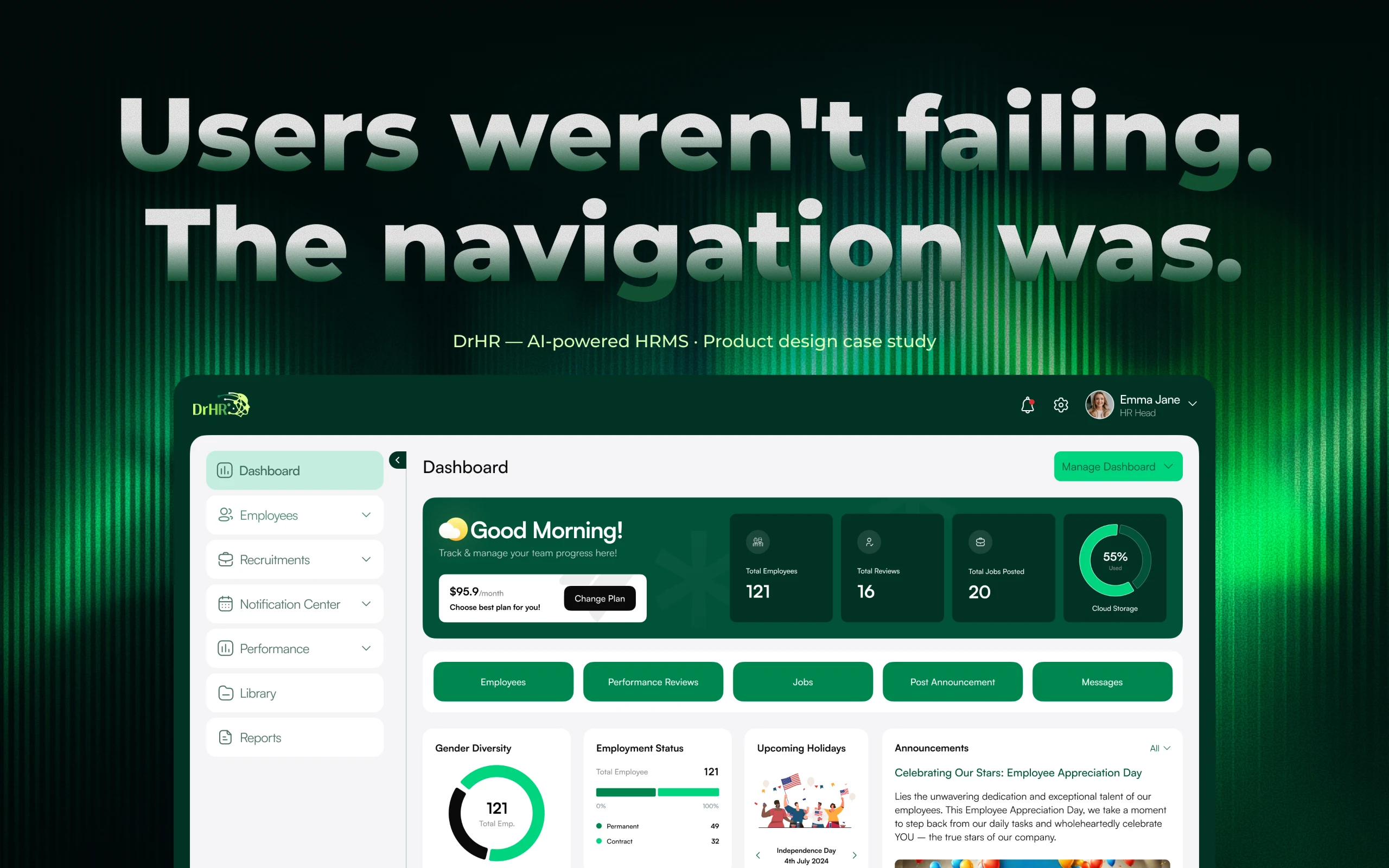
DrHR is an AI-assisted HR platform for small and mid-sized businesses in the US. It covers the whole employee lifecycle — hiring, onboarding and offboarding, people records, documents, announcements and performance reviews — so a growing company doesn’t have to build an HR department before it can afford one.
Three very different people use the same product: HR managers who run the processes, team managers who hire and review their people, and employees who want answers without waiting on HR. Founders and C-suites use it to see the whole company at a glance.
The founder’s brief was simple: small businesses should spend their money on growth, not on heavy HR software. The tools they could buy were either too rigid, too thin or too expensive.
HR teams had to change their processes to fit the tool. Every company works differently, and the tools ignored it.
Managers rated employees and that was the end of it. Employees had no voice, no history and no idea how they were judged.
Spreadsheets, email threads, PDFs and chat. Nobody could see who was hired, who had which laptop, or which review was still pending.
The powerful suites were dense and priced for big companies. The simple ones ran out of road as soon as a team grew.
Job descriptions, first-pass application reviews and repeated policy questions are high-volume and rules-based — a natural fit for AI.
Org charts, calendars, personnel files and reviews in the employee’s own hands take a big share of the load off HR.
Sessions with the founder and leadership, interviews with HR professionals across industries, workflow mapping and a teardown of the leading HR tools.
Mapped every module to what HR, managers and employees each need, so one product could serve all three without three products’ worth of navigation.
Several wireframe concepts per module, critiqued with stakeholders, then combined into one direction — performance reviews first.
The visual language, components and patterns for web and mobile, built so the team could ship module after module consistently.
DrHR went live for US small businesses and was featured by the Los Angeles Times in May 2025.
DrHR has grown beyond small businesses: it now supports 500+ employees and has cut HR operations overhead by 35%.
Before designing anything, we spent time with the people who would live in the product every day — and with the founder, who had run a software company herself.
Every organisation runs HR its own way. The software had to adapt to their workflows — not the other way round.
HR managers didn’t have time to decode complex screens. Powerful had to still mean obvious.
People wanted smarter suggestions but were wary of AI that felt impersonal or took decisions away from them.
Reviews that only go top-down breed mistrust. Employees wanted a voice and managers wanted to be reviewed fairly too.
“I owned DrHR’s design from the first stakeholder conversation to the live product — the research, the structure, every module and the system the team built on.”
Every module I designed, across web and mobile, for three kinds of user.
What needs attention today — headcount, reviews, open jobs, announcements, holidays and quick actions.
People records, org chart and personnel files, with role-based access to sensitive data.
Job posts with AI-drafted descriptions, applications, interview stages and offer letters signed online.
Guided checklists that also track equipment and system access, so nothing walks out the door.
Three-level reviews — self, manager and HR — with history, analytics, praise and improvement plans.
Company-wide announcements and HR updates that reach everyone instantly.
Policies and company documents in one searchable place.
People, hiring and review reports for HR and leadership.
Answers questions and drafts the routine work, always for a person to review.
Team channels, direct messages and threads, so HR conversations don’t live in another tool.
Public recognition anyone can give, shown on the person’s profile and in their reviews.
Employee self-service on iOS and Android: profile, team, praise, performance, events and messages.
In most HR tools, a performance review is a one-way street: a supervisor fills in a form and the employee finds out later. Managers are never reviewed, employees never get to explain, and nobody can see a trend over time.
I sketched three directions. The first was a simple list of reports — clear, but one-directional. The second added a self-review so employees could give their side. The third gave employees their own analytics, so a review became something they could act on.
Each solved part of the problem, and feedback on all three made the answer obvious: combine them. The final design gives every employee a review report, a self-review and a view of their own progress across the year.
Why this, not thatI didn’t ship the simplest version. One-directional reviews were faster to build, but they would have repeated the exact problem DrHR set out to fix.
Once reviews flowed in every direction, someone had to keep them moving. Managers needed to review their team and see what was still pending. HR needed to see the whole organisation and make the final call.
For HR I explored several dashboard directions on paper. I dropped a department performance graph that looked good but didn’t help anyone decide anything, added a separate list of top managers so leadership was judged too, and added sign-off progress for every team manager.
The result is two focused views: one where managers review and track their own team, and one where HR sees who is excelling, who needs support and what is still waiting for sign-off.
Why this, not thatI kept HR’s dashboard about decisions, not tasks. Peer reviews for HR, automated monthly email reports, visual progress timelines and PIP reminders on every dashboard were all explored — and all cut, because each one added noise to a screen that needed to stay clear.
The founder’s goal was for a small business to run HR in far less time. AI was the way to get there — but research had already told us people didn’t want an HR tool that felt cold or took decisions away from them.
So the rule was simple: AI drafts, people decide. It writes the first version of a job description, takes the first pass at a stack of applications and answers the questions employees would otherwise send to HR. Every output is editable, and nothing goes out without a person saying so.
The assistant sits one click away on every screen, so it helps in the moment without pulling anyone out of what they were doing.
Why this, not thatI didn’t make AI autonomous. In HR, one wrong automated message can damage trust in a way no time saving makes up for.
HR teams don’t sit at a desk all day, and most employees never open an HR dashboard. So the employee side of DrHR lives on the phone — answering the questions people used to send to HR.
Profile, team, praise, performance, documents, events and messages in one app — so HR stops being the company help desk.
Sign in, verify with a one-time code, then a short “craft your profile” step new joiners can skip and finish later.
A morning greeting, an inbox that says what needs attention, upcoming holidays and the organisation feed.
Company news filtered by organisation, with likes and comments so updates become conversations.
Birthdays, anniversaries, holidays and company events in a calendar or a list, with a quick message to send wishes.
Personal details, the reporting line up to the next-level manager and a timeline of every role change.
Give recognition with a category and a note; it shows on the person’s profile and feeds their reviews.
Average rating and every monthly report, ready to download.
Team channels, direct messages and threads — company conversations without another chat tool.
HR teams wanted control over workflows, templates and permissions — without the complexity that usually comes with it. Smart defaults with configuration tucked one level down gave them both.
HR, managers and employees need very different things from the same data. Role-based views kept each screen about the person looking at it.
Reviews had to flow both ways without blurring who makes the final call. HR keeps the last word; everyone else gets a voice.
Reviews, people and hiring generate a lot of data. Separate pages for tracking, summaries first and details on demand kept HR from drowning.
Helpful AI and HR that feels personal pull in different directions. Drafts and suggestions — never silent actions — kept both.
Sized for teams of up to 100 people, but structured so bigger companies wouldn’t outgrow it.
DrHR needed an identity before it needed screens. The logomark joins a human head with circuitry — people first, powered by technology — and the same greens carry through every screen on web and mobile.
+15%
Task completion after research exposed critical navigation failures and the information architecture was rebuilt.
Source: task tracking, Biz4GroupOne-way3-level (from One-way to 3-level)
Performance reviews now run employee → manager → HR, with history and a full sign-off log.
Source: shipped productChasingTracked (from Chasing to Tracked)
Review completion and sign-offs are visible on a dashboard instead of followed up by hand.
Source: shipped productMemoryData (from Memory to Data)
Top performers and top managers are recognised from a year of review data, not from who was most visible.
Source: shipped productScatteredOne place (from Scattered to One place)
Hiring, onboarding, records, documents and reviews live in one product for HR, managers and employees.
Source: shipped product≤100500+ (from ≤100 to 500+)
Employees supported today: built for small businesses, DrHR has since scaled and cut HR operations overhead by 35%.
Source: Biz4GroupBriefLA Times (from Brief to LA Times)
Live with US small businesses and featured by the Los Angeles Times in May 2025.
Source: Los Angeles Times, 1 May 2025None of my three review concepts was right on its own. Putting them side by side is what showed the real solution.
The ideas I dropped — peer reviews for HR, email reports, timelines — made the product better by not being in it.
A system that reviews employees but not managers isn’t fair, and people notice. Fairness has to be built into the structure.
The more control people had over AI drafts, the more they were willing to use them.
DrHR is live for US small businesses — see the product as it is today.
Built for the people side.
Not the paperwork.
DrHR is live and helping small businesses run HR without an HR department, and it was featured by the Los Angeles Times (opens in a new tab) in May 2025. Next, I’d bring the same three-level thinking to goals and one-to-ones, so reviews become a conversation that runs all year.